Priority and Hashavshevet to CRM & WhatsApp
Learn how to connect Priority or Hashavshevet to CRM and WhatsApp with n8n or Make, and plan the right workflows to avoid errors and duplicates.
You can connect Priority or Hashavshevet to CRM and WhatsApp in a reliable, practical way using n8n and Make, but success depends less on the tool and more on the architecture: who is the source of truth, which events trigger sync, and where controls are required. The goal is not “another integration,” but a continuous business process where sales, service, finance, and customer communication all work from the same picture.
Why connect Priority and Hashavshevet to CRM and WhatsApp at all?
In many businesses in Israel, Priority or Hashavshevet hold the critical operational and financial data: customers, orders, documents, inventory, balances, and sometimes even deliveries. At the same time, the CRM manages leads, opportunities, tasks, revenue forecasts, and service, while WhatsApp is the communication channel the customer actually responds to.
The problem starts when each system only knows part of the story. The salesperson sees a hot lead in the CRM, but does not know the customer has an open debt. Accounting issues a document in the ERP, but the customer keeps chasing an update on WhatsApp. Customer service gets a message about a shipment that never arrived, but the delivery status was updated only in Priority or Hashavshevet.
That is why ERP to CRM integration is not a cosmetic improvement but a move that shortens response time, reduces duplicate data entry, and leads to better decisions. If you want to understand the infrastructure layer behind projects like this, it is worth reading how to connect business systems via API using n8n and Make as well.
What actually needs to move between systems?
The common mistake is trying to “sync everything with everything.” In practice, it is better to choose clear objects and events:
- New customer or customer detail update
- Opportunity won in the CRM and turned into an active customer in the ERP
- Quote or order created in the ERP and recorded in the CRM
- Invoice or receipt sent to the customer on WhatsApp as well
- Delivery status, debt, or service ticket change
- Task opened for a representative when the customer replies on WhatsApp
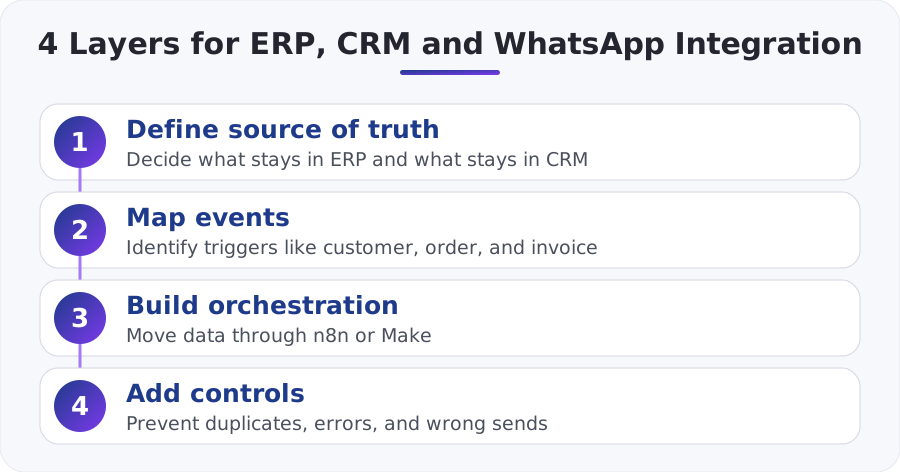
Here it is important to decide who is the source of truth for each area. In most cases:
- ERP: prices, inventory, financial documents, order status
- CRM: leads, pipeline, customer ownership, tasks, sales history
- WhatsApp: notifications, approval collection, status updates, customer service
| Entity/Event | Recommended source of truth | Sync to | Why it matters |
|---|---|---|---|
| New lead | CRM | ERP only after win/approval | Prevents unnecessary customer records |
| Active customer | ERP or CRM depending on business process | The other system + WhatsApp | Ensures consistent details |
| Order | ERP | CRM + WhatsApp | Gives sales and service a live view |
| Invoice/receipt | ERP | CRM + WhatsApp | Fast service and full documentation |
| Customer reply on WhatsApp | WhatsApp/Inbox | CRM + task for a rep | Closes the service and sales loop |
What does the right architecture with n8n and Make look like?
In practice, n8n or Make serve as the orchestration layer between the systems. They receive a trigger, perform checks, enrich information, update additional systems, and send the right message.
A common pattern looks like this:
- An event is created in the ERP or CRM
- A webhook or polling triggers a scenario in n8n or Make
- The scenario checks whether the record already exists in the other system
- Fields are mapped and data is written
- If the conditions are met, a WhatsApp message is sent or a task is opened
- An internal log is stored for control and troubleshooting
You can build the automation layer itself with n8n or with Make. If you are still choosing between the tools, it is recommended to review Make.com vs n8n for choosing a business automation tool to understand when each platform is a better fit.
When is n8n the better fit?
n8n is especially suitable when you need more complex logic, self-hosting, high control over the flow, custom connections, or tight work with APIs, webhooks, and code. In projects where connecting Priority to CRM includes many business conditions, exception handling, and detailed logs, n8n usually offers more flexibility.
When is Make the better fit?
Make is a good fit when you need a fast go-live, a clear visual builder, and relatively simple maintenance for standard processes. If you have a limited number of clear flows, such as opening a customer, sending a document, and updating the CRM, many businesses prefer to start there and then expand.
Which processes should you automate first?
The right way is to start with flows that have immediate value and relatively low risk. You do not begin with a full sync of every ERP table.
1. Opportunity won in the CRM → open customer in the ERP
When a deal moves to “closed,” the automation checks whether the customer already exists in Priority or Hashavshevet. If not, a customer card is created with only the basic fields, and a representative gets an alert if essential information is missing, such as company registration number, billing address, or financial contact person.
2. Document from the ERP → update CRM and send WhatsApp
A quote, order, or invoice was created? The automation records the document in the CRM and sends the customer a WhatsApp message with a link, status, or request for approval. If you are building a service around this channel, it is also worth diving into the article about WhatsApp as a business platform for automation and customer service.
3. Delivery status change → proactive customer message
When an order moves to “shipped” or “ready for pickup,” the customer receives an automated message with appropriate business wording. This saves phone calls, reduces load on customer service, and lowers uncertainty.
4. Reply on WhatsApp → create a task in the CRM
A customer wrote “I didn’t receive it,” “I’d like a copy of the invoice,” or “I want to change the address”? Instead of the message getting lost, it can be routed to the CRM, assigned to the account owner, and turned into a task with an SLA. This is also where the broader side of a WhatsApp bot and AI agent for CRM connection in Israeli businesses comes in.
What is the difference between Priority and Hashavshevet in a project like this?
In principle, the two cases are similar: an ERP on one side, a CRM on the other, and WhatsApp as the communication layer. But at the implementation level, there are differences that should be checked already during the scoping stage:
- API availability or integration mechanisms: depends on the version, modules, and deployment environment.
- Customer identification method: customer number, company registration number, email, phone, or internal ID.
- Document structure: which data is considered final, and what the correct trigger for sending is.
- Update frequency: some businesses need near real-time, while others are fine with syncing every few minutes.
So when people say “Priority to CRM” or “Hashavshevet to WhatsApp,” they are not talking about a one-size-fits-all off-the-shelf product. They are talking about an integration project where business rules are defined according to how the business itself operates. If your goal is to connect everything without creating operational chaos, it also helps to read connecting CRM, WhatsApp and invoices without the chaos.
What does a real-world example of such a process look like?
Let’s take a wholesale business that receives about 40 orders a day. Before automation, each order required three manual actions: updating the status in the CRM, sending the document to the customer, and opening a follow-up task for the salesperson. If each action takes about 2 minutes, that is about 240 minutes of work per day, or roughly 4 cumulative hours.
After the connection:
- The order is created in the ERP
- n8n or Make detect the event
- The CRM is updated automatically with the order number and status
- The customer receives a WhatsApp message with a receipt confirmation
- If there is a mismatch between the customer’s phone and the CRM, an exception task is opened instead of an automatic send
This is not magic, but a systematic reduction of manual work and errors. In many cases, it also creates an excellent foundation for CRM and WhatsApp onboarding automation for new customers later on.
What usually goes wrong in projects like this?
The common failures almost always repeat themselves:
Duplicate customers
If there is no consistent identification key, the same customer gets created twice: once in the CRM and once in the ERP. The solution is to decide in advance what the primary identifier is and to define checks before creation.
Sending WhatsApp too early
Many businesses send a message the moment a document is created, even though the document has not yet passed review. It is better to send only after a clear, approved status. It is also important to work according to the template and message rules of the WhatsApp Business Platform.
No error control
If the API is unavailable, the process must not disappear silently. You need retries, alerts, and logs. In both n8n and Make, you can build structured error paths.
Trying to make everything fully two-way from day one
Full two-way sync sounds good on paper, but it dramatically increases exception complexity. It is better to start with one direction for each object, and only then expand.
How do you start without disrupting existing work?
The safe recipe is a short, phased process:
Step 1: Choose one process with clear ROI
For example, “an invoice from the ERP is recorded in the CRM and sent on WhatsApp” or “a win in the CRM opens a customer in the ERP.”
Step 2: Map fields and exceptions before building
Not just required fields, but also questions like: What happens when there is no phone number? What happens when there are two contact people? Who approves customer creation?
Step 3: Build a test environment and logs
Before production, run scenarios on real examples: new customer, existing customer, open debt, missing phone number, canceled document.
Step 4: Go live with control metrics
Handling time, number of exceptions, success rate of sends, number of duplicates prevented. Without measurement, it is hard to know whether the integration really improved the process.
Bottom line
Connecting Priority and Hashavshevet to CRM and WhatsApp using n8n and Make is not only possible, but also a move with very high business value when it is planned correctly. The key is not to start with the question “how do we move data,” but with the question “which business process needs to happen without manual touch, without duplicates, and without losing control.”
A business that does this right gets a unified customer view, faster communication, less manual work, and fewer errors between sales, service, and finance. And precisely because it sounds simple, it is important to build it as an integration project with a clear source of truth, phased automations, and exception control from day one.
What wears you out most in your business? Pick one and we'll start there
One click, and the form is already partly filled in.