CRM & WhatsApp Onboarding Automation
Practical guide to building new customer onboarding automation in CRM and WhatsApp: client setup, data collection, kickoff, control, and handoff to the team.
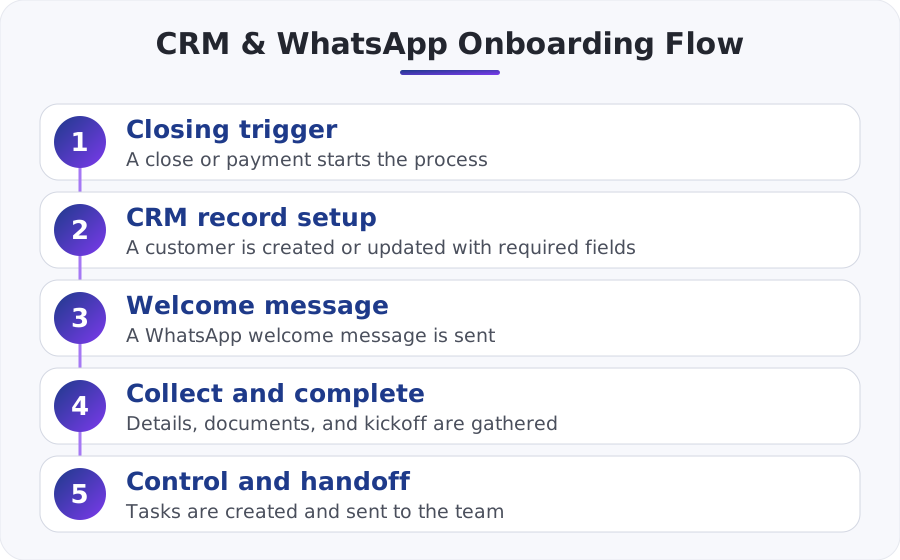
New customer onboarding automation in CRM and WhatsApp is a sequence of actions triggered immediately after a deal closes or a payment is received: creating or updating the customer record, sending a welcome message, collecting missing details, scheduling a kickoff, and creating tasks for the team. When this sequence is built correctly, the customer gets a fast, consistent start and the business reduces mistakes, delays, and reliance on staff memory.
Why is onboarding a classic process for automation?
Onboarding is exactly where small and mid-sized businesses fall through the cracks. The sale is already closed, the customer expects a fast start, but in practice someone still has to open a CRM record, verify billing details, request documents, schedule a meeting, notify the team, and update statuses. When all of that happens manually, delays, duplicates, and inconsistency appear.
The reason this is a classic candidate for simple automation is straightforward: it repeats itself, it has a clear trigger, and it includes a relatively fixed sequence of steps. Not every onboarding process needs AI, but almost every business onboarding process does need automation.
| Process point | Manual work | Automated process |
|---|---|---|
| Customer response time | Depends on staff availability | Immediate after the trigger |
| Opening the customer in the CRM | Prone to misses | Opened according to required fields |
| Collecting missing details | Done in pieces | Structured in a fixed order |
| Status documentation | Sometimes forgotten | Updated automatically |
| Handoff to the team | Depends on an internal message | A task is created with a clear owner |
A practical example: a service business that brings in 30 new customers a month, and whose team performs 4 manual actions of about 3 minutes each during every intake, wastes roughly 6 hours a month just on basic opening tasks. That’s before mistakes like a customer not receiving a welcome message, a meeting not being scheduled, or a document not being collected.
What must happen in the first few minutes after closing?
The most critical stage is the window between the close and the moment the customer feels that someone has actually taken ownership. Good onboarding does not start the next day; it starts as soon as the system detects that the deal has closed, the payment has been received, or the quote has been approved.
Here is the right basic sequence:
- Identify a reliable trigger: deal marked closed, invoice paid, or onboarding form completed.
- Create or update the customer record in the CRM.
- Check required fields: contact name, phone, email, purchased package, account owner, start date.
- Send a WhatsApp opening message with clear expectations for the next step.
- Collect missing details or documents.
- Schedule a kickoff meeting or launch the service.
- Open internal tasks and update the onboarding status.
If the connection between sales, the CRM, invoicing, and messages is still messy, it’s worth reading Connecting CRM, WhatsApp, and invoicing without the mess, because unstable onboarding is usually a symptom of a fragmented infrastructure.
How do you build the flow between CRM and WhatsApp?
The common mistake is starting with the message itself. In practice, you start with the business logic. First, define what triggers the process, what information must exist in the CRM, and only then decide what gets sent to the customer and through which channel.
Step 1: Define one main trigger
It is better to choose one event that starts the entire flow, for example:
- Deal status changes to closed
- First payment is received
- Quote is signed
The rule is not to launch onboarding from several sources at once without a duplication-prevention mechanism. Otherwise the same customer will receive two welcome messages and two internal tasks.
Step 2: Normalize the data
Before sending anything on WhatsApp, the system should verify:
- that the number is in a valid format
- that there is a relevant contact name
- that there is an assignment to an account owner or department
- that the package or service type is marked correctly
Step 3: Trigger a tailored welcome message
At this point, you can send a welcome message, but with an operational purpose, not just nice wording. A good message does three things: confirms that onboarding has started, explains what happens next, and drives one clear action.
At the infrastructure level, these processes are usually built on webhooks, APIs, and an automation engine. If you are evaluating the connection layer itself, read about Connecting business systems with API using n8n and Make.
Which fields and statuses must exist in the CRM?
Without a structured data model, onboarding automation turns into a string of messages with no control. In the CRM, you need to define a minimum set of operational fields that support both automation and human oversight.
Recommended fields:
- Onboarding status
- Start date
- Purchased service or package
- Primary contact
- Verified WhatsApp phone number
- Documents received or missing
- Kickoff date
- Account owner
- SLA for the next action
- Onboarding started yes/no flag field
Simple statuses are enough for most businesses:
- New after close
- Waiting for details
- Waiting for documents
- Kickoff scheduled
- Handed over for delivery
- Completed
- Human follow-up required
If your CRM supports workflows, you can build these transitions in an orderly way. For example, in the official HubSpot workflows documentation you can see how to define triggers, conditions, and follow-up actions based on fields and statuses.
How do you integrate WhatsApp without creating chaos?
The big advantage of WhatsApp is that customers actually read messages there. The downside is that many businesses use it as a mix of screenshots, manual messages, and poor documentation. Therefore, the goal is not just to send messages on WhatsApp, but to turn WhatsApp into a documented channel connected to the CRM.
At the system level, it is worth becoming familiar with the WhatsApp Business Platform and not relying only on manual work from a phone. This is especially important when you need triggers, documentation, assignment to a team member, and message control.
In addition, when it comes to proactive messages, approved templates are used according to the platform rules. You can see the framework in the official Meta message template documentation. From a business perspective, this means that already at the planning stage you need to define which welcome, reminder, or document-request messages are sent as templates, and which messages are written inside an active conversation.
If you want to understand the channel itself in more depth, the article on WhatsApp as a business platform for automation and customer service explains the operational considerations you need to know. And if your goal is a full connection between the channel and your customer base, see also the guide on WhatsApp bot and AI agent for connecting CRM in Israeli businesses.
When do you need AI and when are rules enough?
In most early onboarding processes, simple rules are completely enough. If the customer needs to receive a welcome message, send a document, choose a meeting time, and update a status, there is no reason to complicate the system with an unnecessary AI layer.
AI comes into play when there is high variation in answers, a need for smart classification, or free-text analysis. For example:
- Detect whether the customer has already sent all the documents
- Summarize long answers into structured CRM fields
- Route automatically based on the type of need raised in the conversation
- Detect onboarding risk signals such as confusion, objection, or delay
If you are deciding between a simple bot and a smarter layer, the article on How to choose a WhatsApp bot for your business and CRM integration will help distinguish a real AI need from standard automation.
What are the common mistakes in the process?
Sending a welcome message without logic behind it
If the message was sent but the customer was not opened correctly in the CRM, you do not have onboarding. You have a nice message without a process.
Triggering the same process twice
This happens when both a payment and a status change trigger the same flow. You need a unique identifier or a field that marks the process as already started.
Too many questions in the first message
The customer has just bought. This is not the time for an interrogation. In the first message, ask for one action, at most two.
No exit path to a human
If the customer asks an unexpected question, there should be a quick handoff mechanism to a team member. Good automation does not block human contact; it organizes it.
No measurement
Measure at least four things: time to first message, completion rate for missing details, time to kickoff, and the percentage of cases that require manual intervention.
A practical example for an Israeli service business
Let’s say an accounting firm sells a support package for businesses. As soon as the first payment is received, the automation creates a customer in the CRM, assigns an account owner, sends a welcome message on WhatsApp with a link to upload documents, and updates the status to waiting for documents.
If the customer uploads documents within 24 hours, the status changes automatically to ready for kickoff and a message is sent to schedule the opening call. If no documents are received, one reminder is sent. If there is still no response after that, a task is opened for a service representative with a clear due date.
What is the gain here? Not just time savings. The gain is that every customer goes through the same basic path, and the team can see in real time who is stuck, who has moved forward, and what is missing before work can begin. That is exactly the difference between service that looks professional from the outside and operations that feel professional from the inside as well.
Summary
New customer onboarding automation in CRM and WhatsApp is not measured by how nice the welcome message sounds, but by the quality of the entire flow: a reliable trigger, clean data, clear statuses, the right messages, control, and a clean handoff to the team. For most SMBs in Israel, this is one of the fastest-returning processes, because it improves both customer experience and operational control.
If you build it correctly, the customer feels that they were taken care of immediately, and your business stops depending on memory, copy-paste, and lost internal messages.
What wears you out most in your business? Pick one and we'll start there
One click, and the form is already partly filled in.