How to Connect Business Systems via API with n8n and Make
A practical guide to connecting business systems via API with n8n and Make: authentication, webhooks, field mapping, security, errors, and tool selection.
Connecting business systems through API using n8n and Make is the right approach when you need to move data and actions between tools that do not communicate well through built-in integrations. In practice, you build a flow that receives an event, verifies permissions, maps fields, sends API requests, and handles errors. The difference between automation that works over time and operational chaos is less about the tool and more about properly defining the data, permissions, and controls.
What Is API System Integration, Really?
An API is the interface that allows one system to ask another system for information or an action: create a lead, update a customer, fetch an invoice, send a message, or check a status. In the context of business API automation, n8n and Make act as a mediation layer that connects source and destination without building a custom integration from scratch.
This is especially important for Israeli businesses that work with a mix of CRM, lead forms, invoices, WhatsApp, service systems, and spreadsheets. Instead of an employee manually moving data between screens, the automated flow does it through structured API calls.
If you are still at the stage where you are checking whether the process is even suitable for automation, it is worth first reading the guide on How to Identify a Process That Fits Automation. And if your challenge is not only API but also architectural order between several tools, a good expansion is in the article about Connecting CRM, WhatsApp, and Invoices Without the Mess.
When Is It Actually Right to Connect Systems via API?
Not every process justifies API integration for businesses. This kind of connection is especially right in four situations:
- When there is no built-in integration between the systems.
- When the built-in integration is too limited and does not support the fields or logic you need.
- When business control is needed in the middle, for example approval before creating an order or blocking an update if a customer ID is missing.
- When you need to connect several systems in one chain, not just one source system to one destination system.
A typical example: a lead comes in from a website form, needs to be checked against an existing CRM, opened as a task in monday.com, sent an approval message on WhatsApp, and only if the customer does not exist, created in the billing system as well. This is no longer a simple field-to-field connection, but a business process with conditions, checks, and multiple actions.
What Does an API Connection Look Like in Practice in n8n and Make?
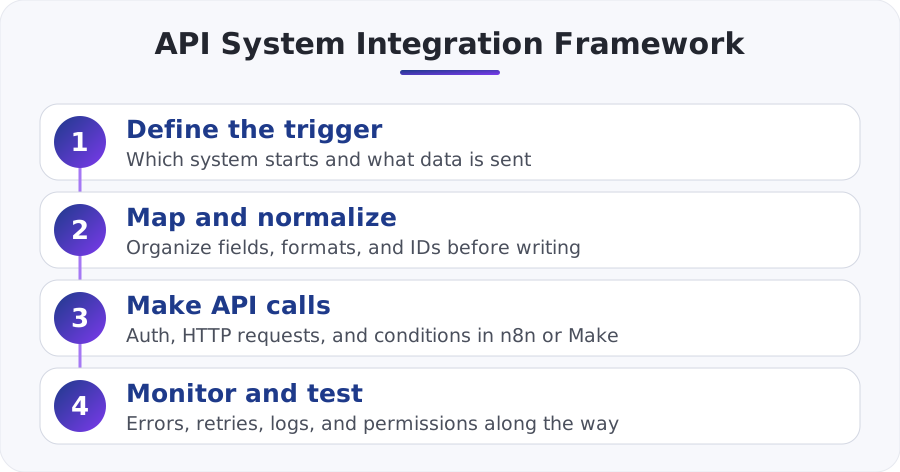
In most cases, the flow looks like this:
1. Define the trigger
The trigger can be a Webhook, a form, an event from a CRM, a scheduled task, or a record change. For example, if an external system can send a POST to a Webhook, you can capture the data directly in n8n or in Make.
2. Verify permissions
Here you define how you authenticate against the system: API Key, Bearer Token, OAuth, or a custom signature. This is the stage where many projects get stuck, because without the right permissions there is no automation, only a series of 401 and 403 errors.
In n8n, the HTTP Request node is widely used and officially documented here: n8n HTTP Request documentation. In Make, the common approach is to work with the official HTTP module, documented here: Make official HTTP module.
3. Map and normalize fields
This is the really critical stage. One system may send phone, another mobile, and a third requires the number in international format. The same applies to dates, statuses, customer IDs, currency, and required fields. Without normalization, API system integration will look fine in a demo and break in the real world.
4. Send API requests
Here you perform GET, POST, PATCH, or DELETE as needed. Sometimes you need to search for an existing record first, then update it, and only if it is not found create a new one. This is basic upsert logic, and it prevents unnecessary duplicates.
5. Handle errors and responses
A valid response is not only status 200. You also need to check whether a proper ID was returned, whether any fields are missing, and what happens in a case of 429 due to rate limiting. A good connection includes retry, timeout, logs, and alerts.
Practical Example: A New Lead From the Website to CRM and WhatsApp
Let us say a service business receives a lead from a website form with the fields: fullName, phone, email, serviceType, and source. The goal is to update the CRM, open a task for a representative, and send an approval message to the customer.
This is what it looks like in practice:
- The form sends a Webhook to n8n or Make.
- The flow cleans the phone number into a uniform format, for example 972 instead of 0 at the beginning of the number.
- A GET request is sent to the CRM API to check whether a customer already exists by email or phone.
- If the customer exists, a PATCH request updates the lead details and adds a note.
- If the customer does not exist, a POST request creates a new contact.
- A task is then created in the work system for the sales team.
- Finally, a template WhatsApp message is sent through Meta's official API.
The important point here is not the send itself, but the order of the actions. If you send the message before checking duplicates, representatives will receive duplicate tasks and customers will get inconsistent messages. If you are working on a scenario like this, it is worth going deeper into the article on WhatsApp Bot and AI Agent for Connecting CRM in Israeli Businesses.
For the official documentation of the sending channel itself, you can use Meta's WhatsApp Cloud API.
Which Tool Is Better: n8n or Make?
The short answer: both can implement n8n API and Make API at a high level, but not always for the same purpose.
| Criteria | n8n | Make |
|---|---|---|
| Setup speed | Good, but a bit more technical | Very fast for most teams |
| API and HTTP control | Very high | High, with a smooth building experience |
| Complex logic | Very strong | Very good, but sometimes less flexible |
| Self-hosting | Yes | Not with the same flexibility |
| Fit for technical teams | High | Medium to high |
| Fit for SMBs that want speed | Good | Excellent |
If you are deciding between the tools at the system level, continue with the full analysis on Comparing Make.com and n8n for Choosing a Business Automation Tool. And if you have an unusual, sensitive process or one that requires deeper control, it is important to read When n8n Beats an Off-the-Shelf Solution as well.
In practice, the choice should be based on three things:
- The complexity of the logic.
- The sensitivity of the data and the need to control the runtime environment.
- Who will maintain the automation in six months, not just who is building it this week.
What Must Not Be Missed in Security, Reliability, and Control?
This is the point business owners tend to underestimate, and then pay for later.
Keeping secrets and permissions safe
API keys and tokens should not be stored in text fields or inside a regular node if it can be avoided. Use the tool's credentials mechanism, reduce permissions, and rotate keys when there is a change in employee or vendor access.
Idempotency and duplicate prevention
If the same Webhook is sent twice, the automation should not create the same deal twice. That is why you need a unique identifier, an existence check before creation, or an idempotency key if the API supports it.
Handling 429 and schema changes
External systems change. A field that existed yesterday may change, and a rate limit may return 429. That is why you need to build a retry path, separate a temporary error from a business error, and define an alert when the number of failures crosses a pre-set threshold.
Approvals for sensitive actions
Not every update should run automatically to the end. If the automation deletes data, issues a refund, or closes a deal, it is worth adding a human approval step. This is part of a healthy automation policy, similar to the principles outlined in the article on AI Governance in a Business and Who Approves Agent Decisions and Automations.
How Do You Start Without Creating Technical Debt?
The right way to start an API integration for businesses is not to connect everything in one day, but to work in layers:
- Choose one process with clear value, such as lead intake or order status synchronization.
- Define source fields and destination fields in a structured table.
- Test the API calls manually before building the full flow.
- Build an MVP version with logs, retry, and a basic alert.
- Only after two or three weeks of stability, expand to more systems and logic.
In other words: first a working process, then a full ecosystem. This is the approach that reduces risk and makes it possible to measure real results.
Summary
Connecting systems via API using n8n and Make is not a matter of clicking two buttons, but of properly planning triggers, permissions, field mapping, and error control. When done correctly, you can connect CRM, forms, WhatsApp, accounting, and service systems into one consistent flow that saves time and prevents manual mistakes.
For SMBs in Israel, the choice between n8n and Make should be practical: Make is excellent when you need speed and relative simplicity, while n8n is especially strong when you need control, deep logic, and a more flexible working environment. What will determine success is not the platform name, but whether you built an integration that understands the business and not just the API.