Official WhatsApp API: Setup, Pricing & AI Agents
A practical guide for businesses to the official WhatsApp API: setup, pricing, and how to connect AI agents with CRM and automation.
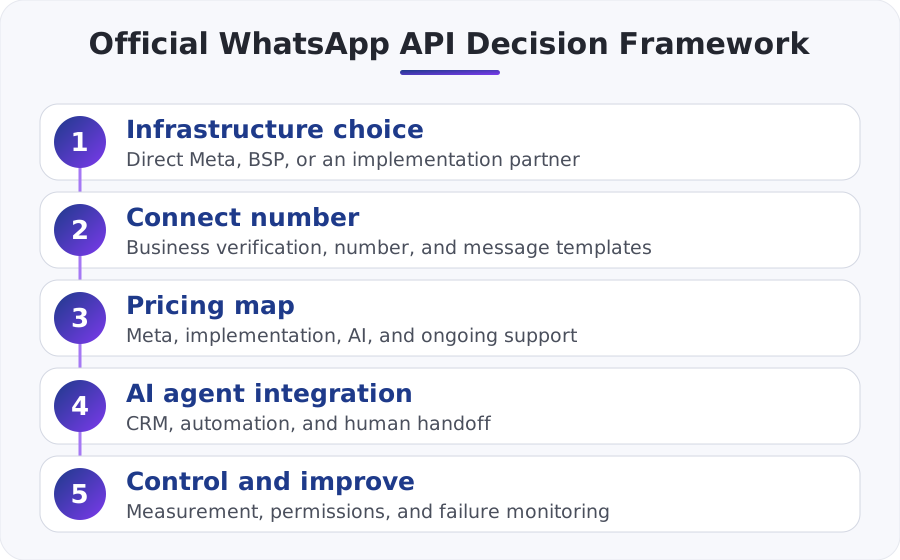
The official WhatsApp API is the right way to connect your business number to CRM, automation, and AI agents without relying on unofficial, fragile solutions. Connecting the WhatsApp API requires a proper Meta Business environment, a suitable number, and a structured implementation process, and pricing includes not only Meta’s cost but also the system, integration, and AI layer. For a small or medium-sized Israeli business, the biggest value comes when the channel is tied to real processes and not just basic automated replies.
What exactly is the official WhatsApp API?
When people say "official WhatsApp API," they mean Meta’s WhatsApp Business Platform — an official interface that lets a business connect its WhatsApp number to other systems: CRM, service desks, online stores, automations, and AI agents. It is not the same as the WhatsApp Business app on a phone, and it is not WhatsApp Web with improvised automations.
The main advantage of the official route is stability, compliance with Meta’s policies, real API connections, structured permissions, the ability to work with multiple agents, and the ability to implement business logic. Anyone who wants to understand the platform structure from the source can start with Meta’s official documentation: WhatsApp Business Platform.
In practice, this is the difference between "we have WhatsApp" and "our WhatsApp is connected to the business." If you want every inquiry to open a lead, check order status, identify a returning customer, and know when to hand off to an agent, you are already in the API world. We also expanded on this thinking in the article about WhatsApp as a business platform for automation and customer service.
How do you connect the WhatsApp API in practice?
Connecting the WhatsApp API looks simple from the outside, but it has several layers that need to be set up correctly:
1. Open a Meta Business environment
You need a properly configured Meta Business account, business verification if needed, and setup of the relevant assets. Without this, it is difficult to move forward properly.
2. Assign a suitable number
The number connected to the API must be managed correctly with Meta. A key rule: a number cannot run in the WhatsApp Business app and the official API at the same time in the same configuration. So before making the switch, you need to decide whether the main number stays in the app or moves to the platform.
3. Choose a connection route
There are three common ways:
- Direct connection to Meta’s Cloud API
- Connection through a BSP or technology provider
- Connection through an implementation partner that builds the integration, the automation, and the AI layer
4. Set up webhooks and workflows
To make incoming messages trigger a real action, you need to connect webhooks, automations, and follow-up systems. If a lead comes in, someone needs to create a ticket, update the CRM, send a reply, and assign ownership to the conversation.
5. Message templates and approvals
Not every proactive message is sent the same way. You need to define Template Messages according to policy, submit them for approval, and understand when to send a service message, reminder, marketing message, or alert.
This is where integrations come in. If the business needs to connect WhatsApp to CRM, calendar, accounting, or ERP, it is worth working with a structured architecture. Especially relevant here is our article on how to connect business systems via API using n8n and Make, as well as the guide on connecting CRM, WhatsApp, and invoices without the mess.
What does WhatsApp API pricing really cost?
This is one of the most important questions, and also one of the most confusing. WhatsApp API pricing is not just "how much does the message cost." In practice, there are several cost layers that need to be calculated together:
- Meta’s own cost – based on Meta’s current official pricing model, which varies by country, message type or usage category, and policy updates. That is why it is not right to rely on an old post. It is better to always check Meta’s official pricing page.
- Provider or infrastructure cost – if you work through a BSP, service system, Israeli provider, or external platform, there may be subscription fees, connection fees, or transfer commissions.
- Implementation cost – scoping, system connections, testing, templates, permissions, and edge cases.
- AI layer cost – language model, memory, API calls, context retention, control mechanisms, and handoff to an agent.
- Ongoing maintenance – monitoring, bug fixes, policy adjustments, workflow improvements, and performance analysis.
To make this concrete, here is the right way to think about pricing:
| Cost component | What affects it | What businesses miss |
|---|---|---|
| Meta | Target country, message type, current policy | Assuming there is one fixed price |
| Provider/platform | Subscription fees, commission, built-in features | Not checking what is included in the plan |
| Implementation | Connection and process complexity | Pricing only "opening a number" |
| AI | Conversation volume, response complexity, integrations | Forgetting to measure cost based on real usage |
| Ongoing operations | Improvements, support, control | Assuming there is no work after going live |
A practical example: an e-commerce store can trigger an abandoned-cart template 45 minutes after checkout is abandoned. If the customer replies, "Do you deliver to Ashdod?", an AI agent can check shipping policy and stock in real time. But if the customer writes, "I need to pay by phone" or "Please update my address," the conversation now involves another system or an agent, so the real cost is not just sending the message, but the entire handling chain.
If you want to go deeper specifically into costs, it is worth reading the article on how much a WhatsApp bot costs for businesses and our update on WhatsApp service message pricing in Israel after Meta’s 2026 changes.
Where do AI agents in WhatsApp actually add value?
The common mistake is thinking that an AI agent in WhatsApp is just a chatbot with nicer wording. In practice, a good agent is a layer that understands context, operates systems, decides when it is enough to answer on its own, and when to hand off to a human.
AI agents in WhatsApp are especially suited to 4 types of tasks:
- Initial responses to repeated questions
- Collecting missing information before an agent joins
- Pulling data from systems like CRM, orders, or calendar
- Carrying out simple actions with clear permission rules
For example, a clinic may receive a message like, "Can I book a dental cleaning appointment next week in the evening?" A good AI agent will not just return generic text; it will check availability, ask which branch, suggest two slots, and save all conversation details to the CRM. If an unusual question comes up, it hands off to an agent with full context. This is exactly the point where a WhatsApp bot and AI agent for CRM integration in Israeli businesses becomes a real operational solution instead of a marketing promise.
If you are debating whether you need an agent or just a bot, read our comparison as well: AI agent vs. chatbot: what’s the real difference.
When is the API alone not enough?
A technical API connection is only the infrastructure. It does not solve the key business questions on its own:
- Who approves sensitive actions?
- When is the agent allowed to send a proactive message?
- When must it hand off to a human agent?
- What happens if the CRM is unavailable?
- How do you prevent the agent from giving an overly confident answer?
This is where process design, permissions, monitoring, and data quality come in. A business that connects WhatsApp without defining escalation rules, controls, and an activity log will very quickly end up with "automation" it cannot trust. In this context, it is important to think about AI governance as well, especially when the agent does more than answer and also changes statuses, creates tasks, or triggers collections. Anyone at this stage needs to build a process, not just a chat.
How do you choose between direct Meta, a provider, or an implementation partner?
The answer depends on resources and complexity.
Direct Meta is suitable for businesses with internal technical capability or a development team. It gives high control, but also requires full responsibility for connection, maintenance, documentation, webhooks, and security.
A provider or BSP is suitable for businesses that want to shorten setup time and get a ready-made layer for number management, inbox, templates, or analytics.
An implementation partner is especially suitable for SMBs that want a business outcome: not just connecting a number, but building an end-to-end process with CRM, automations, SLA, AI agents, and measurement.
The right choice is not who is "cheapest" on the landing page, but who gives you the level of control you actually need without creating unnecessary dependence. If you run a business with several systems already in place, the real cost of an architectural mistake is usually higher than the savings from a fast connection.
What common mistakes should you avoid מראש?
Building before defining use cases
Many businesses connect the number and then ask what to do with it. You should start with processes: sales, service, collections, reminders, cart abandonment, onboarding.
Adding AI before you have data and a process
An AI agent without a connection to real information is mostly a wording layer. It looks impressive in a demo, but is weak in production.
Ignoring Meta’s policy
Not every proactive message is allowed in every situation. It is important to work according to WhatsApp’s Business Messaging Policy and understand which templates and scenarios are approved.
Not setting up proper handoff to an agent
Success is not measured by how many conversations the agent answered, but by how many conversations were closed correctly. If there is no clear handoff mechanism, the customer feels stuck.
Not measuring
It is worth tracking at least: first response time, handoff rate to an agent, completion rate, cost per handled conversation, and integration failure rate.
The bottom line
The official WhatsApp API is not a single off-the-shelf product, but a business communication layer that only adds value when it is properly connected to systems and processes. If your goal is only to open another messaging channel, a basic solution may be enough. But if you want a WhatsApp API connection that powers service, sales, CRM, and AI agents reliably, you need to plan the infrastructure, pricing, and business logic together.
For a small or medium-sized Israeli business, the right decision is not "should we use AI," but where AI will replace unnecessary manual work without harming the customer experience. When built correctly, WhatsApp stops being just a messaging channel and becomes a real operational channel.
What wears you out most in your business? Pick one and we'll start there
One click, and the form is already partly filled in.