Automated WhatsApp Quotes to Digital Signature
A practical guide to automated WhatsApp quotes for businesses: collect details, generate documents, send for e-signature, follow up, and sync with CRM.
Automated WhatsApp quotes let a business move from a lead conversation to a structured document and digital signature without manual jumps between WhatsApp, CRM, PDF, and email. When built correctly, the process is not only faster; it also prevents mistakes, shortens response time, and keeps a clear trail all the way to approval or rejection.
What does an automated WhatsApp quoting system include?
A good system is not just a bot that sends a file. It is built as a complete business process: intake of the inquiry, identification of the customer type, collection of missing data, quote creation based on a template and pricing, sending for signature, automatic reminders, and status updates in the internal systems.
In practice, most businesses need four layers:
- A WhatsApp conversation channel where the customer leaves a request.
- A logic layer that decides which questions to ask and which quote to generate.
- A connection to documents, digital signatures, and the CRM.
- Automated follow-up until closure or abandonment.
If you have not yet mapped the capabilities and limitations of the channel itself, it is worth first understanding how WhatsApp as a Business Platform for Automation and Customer Service works in practice, because that is where the rules for messages, templates, and system integrations are defined.
What does the process look like from inquiry to signature?
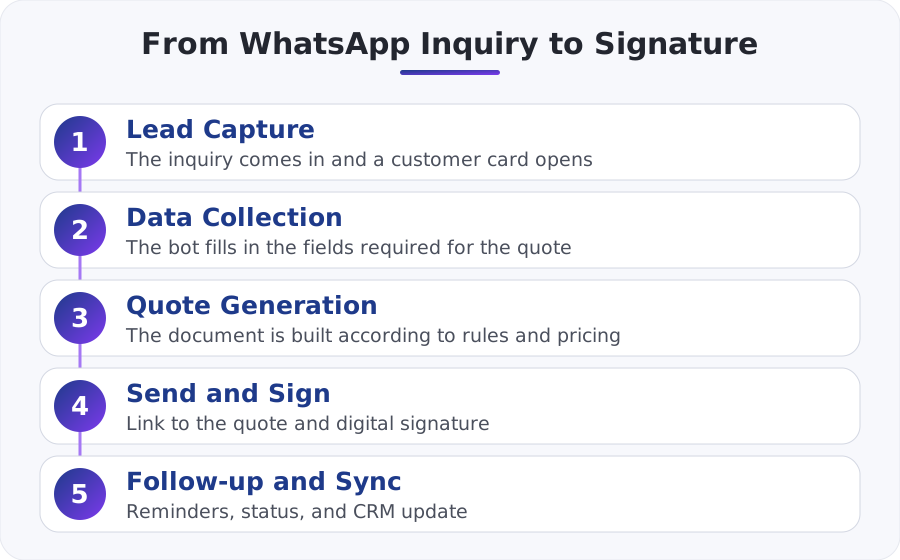
The right way to think about this is not as a document, but as a short sales funnel. Here is a typical process that works well for service businesses, installations, consulting, warm leads, and relatively straightforward B2B sales:
1. Lead capture
The customer writes on WhatsApp, clicks an ad, arrives from a website link, or is transferred from a phone call. The system opens a lead record with the phone number, name if available, source of the inquiry, and entry time.
2. Collection of relevant details
Instead of a representative coming back again and again with basic questions, the bot asks for what is needed for the quote: type of service, quantity, location, urgency, photos, budget, target date, or any other field that truly affects the price.
3. Fit check and routing
Not every lead deserves an immediate quote. If it is a complex, unusual case or one missing critical information, the system routes it to a representative. If it is a standard case, it continues automatically.
4. Quote generation
The system pulls a template, fills in the data, calculates line items, adds fixed terms, totals the final price, and generates a link to a document or PDF.
5. Sending, signing, and follow-up
The customer receives the quote on WhatsApp, opens it, approves it, signs digitally, or requests a revision. If there is no response, reminders are sent according to the rules you defined in advance, and at the same time the CRM is updated.
This is exactly the difference between a nice bot and a bot that drives revenue. If you are interested in the layer that connects the conversation to customer data, we expanded on that in the article about WhatsApp bot and AI agent for CRM integration in Israeli businesses.
What data must be collected before generating a quote?
The most common mistake is trying to generate a quote too early. A good quote requires a minimum set of data, and that minimum differs from business to business. The key is to define required fields and collect only what affects the pricing decision.
For example, in a small renovation business, you can define six required fields: city, type of work, estimated size, photos, target date, and budget range. If the customer answered at least five out of the six fields, the system can generate a draft quote in about 90 seconds. If too much data is missing, a task is opened for a representative instead of sending a weak document.
This is a practical example of the right process:
- A customer sends an inquiry about a bathroom renovation.
- The bot asks for 6 short details and 1 photo.
- If enough information is received, an automatic quote is created with 3 pricing options.
- A signature link is sent immediately in the same conversation.
- If there is no reply after 24 hours, a first reminder is sent.
- After 72 hours, a follow-up task is opened for the sales rep.
In this approach, automation does not guess the price. It applies business rules to structured data. This is especially important when you want to connect CRM, WhatsApp, and invoices without the mess, because a document built on inconsistent fields quickly becomes an operational problem.
Where does automation really save time?
The savings are not only in typing. They come from eliminating manual handoffs between systems and reducing friction for the customer. The table below summarizes the difference:
| Stage | Manual process | Automated process | What you gain |
|---|---|---|---|
| Lead capture | Incoming message gets forgotten in the inbox | Automatic lead card creation | No lost inquiries |
| Data collection | Representative chases missing information | Structured questions by inquiry type | Consistent, faster data |
| Quote creation | Manual copy into a template | Document filled by rules | Fewer mistakes and missing items |
| Sending to customer | Manual PDF or email | Immediate WhatsApp delivery | Shorter response time |
| Follow-up | Depends on the rep's memory | Automatic reminders and statuses | Fewer leads falling through the cracks |
| Signature | File, printing, or another email | Digital signature link | Less friction on the way to closing |
The follow-up stage has especially large business impact. If the message is sent after the service window or as a proactive message, it is important to plan templates and costs correctly. On this topic, we wrote separately about WhatsApp service message pricing for businesses in Israel after Meta's 2026 changes, because this can affect the system's profitability.
How do you connect WhatsApp, a document, and digital signature?
Technically, there is no need to build a system from scratch. In most cases, you build a pipeline that connects WhatsApp, an automation engine, the CRM, a document generator, and a signature service.
According to Meta's official WhatsApp Business Platform documentation, you can manage business conversations, send structured messages, and build logic around message events. When you need to send proactive messages or follow-up templates, it is important to work according to Meta's message template guidelines.
On the signature side, you can connect a dedicated service such as DocuSign eSignature or another solution that returns signature status, a timestamp, and a link to the approved document. The business does not really care whether the signature looks flashy; what matters is that the status returns to the system, the document is saved, and sales knows what happened without asking manually.
From an orchestration standpoint, many businesses in Israel choose between n8n-based workflows, Make, or a partially ready-made solution. If you are at the technical selection stage, a good starting comparison is in the article Make.com vs. n8n for choosing a business automation tool. And if you are still checking budget, the article How much does a WhatsApp bot cost for businesses will help you understand what really affects the cost.
When is full automation too risky?
Not every quote should go out automatically. There are cases where full automation will cause harm:
- Projects with many exceptions or a high level of customization.
- Deals where the profit margin is small and every price discount matters significantly.
- Services that require professional review before pricing.
- Strategic customers where a personal touch is important before sending a document.
In these cases, the system should work as a sales assistant rather than a full replacement. That means: collect the data, prepare a draft, calculate a price range, and then require human approval before sending. This is usually the right model for an Israeli business that wants speed without losing control.
A good rule of thumb is this: if you can explain the pricing with a clear set of rules, you can automate a large part of the process. If the price relies mainly on a professional's judgment, automation should stop before the final send.
How do you measure whether the system really improves closing rates?
Do not measure only how many quotes were sent. Measure the entire funnel:
- Average time from first inquiry to quote sent.
- Percentage of leads that completed all required fields.
- Percentage of quotes opened from WhatsApp.
- Percentage of quotes signed.
- Average time from signature to handoff for execution or billing.
- Rate of leads that needed to be passed to a human representative.
In most businesses, real improvement shows up first in response time and in the percentage of leads that move to the next stage. If in the past it took a rep two hours or half a day to send a quote, and today the customer receives a structured document within minutes, that is already a change that increases the chance of closing, even without changing the price itself.
It is also worth examining quality, not just speed: how many quotes came back for revision, how many were sent with missing details, and how many deals got stuck because of a lack of synchronization between WhatsApp, the document, and the CRM.
Bottom line
Automated WhatsApp quotes are not a sales gimmick but an operational process that connects lead, information, pricing, document, signature, and follow-up. For a small or mid-sized business in Israel, the real value comes when you stop thinking about it as a bot that sends a PDF and start building a clear workflow with required fields, decision rules, human stopping points, and full synchronization with systems.
When the system is built correctly, the customer gets a faster response, the team stops chasing basic details, and the business gets a real picture of what happens between the first inquiry and the signature. That is exactly where good automation turns a WhatsApp conversation into a measurable sales process.
What wears you out most in your business? Pick one and we'll start there
One click, and the form is already partly filled in.